
Antamivi loyalty program
Overview
Antamivi is a loyalty program in which loyalty points are awarded for daily transactions with Bank of Cyprus cards. Payment gateway allows to you to redeem bonus points when paying with cards involved in this program.
This functionality requires a special permission.
Usage scenarios
Inputting payment data on Payment Gateway side
-
A customer initiates payment.
-
The online store server requests an order registration by sending the register.do API call to Payment Gateway.
-
In response to the registration request, Payment Gateway returns a unique identifier of the order in the payment system and the URL to redirect the client to the form for card data collection.
-
The online store redirects the customer to the form for card data collection.
-
The customer enters the card data or selects the stored card and clicks Pay.
-
Payment Gateway interacts with Antamivi system to find out the available discount, vouchers, and the number of redeemable points.
-
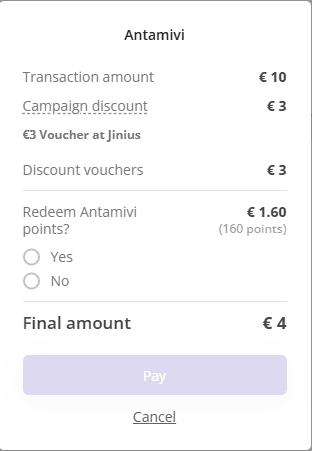
Payment Gateway displays the page with available discount, vouchers, and redeemable points to the customer.
-
The customer chooses to use the redeemable points (the discounts cannot be refused).
-
Payment Gateway performs the payment with redeeming loyalty points.
-
The customer is redirected to the online store page.
-
(Optionally) The online store sends the getOrderStatusExtended.do request to Payment Gateway to check the order status and make sure the order is really paid.
-
In response, Payment Gateway returns the order status data, including the
loyaltyOrderInfoblock with the information about redeemed loyalty points.
Inputting payment data on the merchant’s side
Registration and payment via instantPayment.do
- A customer initiates payment.
- The online store server receives a purchase request and opens a payment page.
- The customer enters their card details on the online store payment page.
- The merchant sends checkLoyalty.do request to Payment Gateway in order to check that the card is involved into Antamivi loyalty program and to find out the available loyalty points number.
- Payment Gateway assigns
loyaltyUuid(identifier of loyalty calculation) to the order. - Payment Gateway checks that the card is involved into Antamivi loyalty program.
- Payment Gateway interacts with Antamivi system to find out the available discount, voucher, and the number of redeemable points.
- Payment Gateway sends the response to the request with available discount, voucher, redeemable points.
- The merchant displays the page with available discount, voucher, redeemable points to the customer.
- The customer chooses to use redeemable points (the discounts cannot be refused).
- The merchant requests an order registration and initiates payment by sending the instantPayment.do request to Payment Gateway, specifying
loyaltyUuidand the indication of the client's refusal to use the maximum number of available loyalty points.
- Payment Gateway performs the payment with redeeming loyalty points.
- Response to the request.
- The online store page displays payment result to the customer.
- (Optionally) The online store sends the getOrderStatusExtended.do request to Payment Gateway to check the order status and make sure the order is really paid.
- In response, Payment Gateway returns the order status data, including the
loyaltyOrderInfoblock with the information about redeemed loyalty points.
Payment by stored credential via paymentOrderBinding.do
- A customer initiates payment.
- The online store server receives a purchase request and opens a payment page.
- The customer enters their card details or selects a stored card on the online store payment page.
- The online store server requests an order registration by sending the register.do API call to Payment Gateway with specifying
clientId(for storing a credential) orbindingId(for existing stored credential). - In response to the registration request, Payment Gateway returns a unique identifier of the order.
- The merchant sends checkLoyalty.do request to Payment Gateway in order to check that the card is involved into Antamivi loyalty program and to find out the available loyalty points number. The request contains
bindingId- stored credential identifier andmdOrder- the order identifier received at step 5. - Payment Gateway assigns
loyaltyUuid(identifier of loyalty calculation) to the order. - Payment Gateway checks that the card is involved into Antamivi loyalty program.
- Payment Gateway interacts with Antamivi system to find out the available discount, voucher, and the number of redeemable points.
- Payment Gateway sends the response to the request with available discount, voucher, redeemable points.
- The merchant displays the page with available discount, voucher, redeemable points to the customer.
- The customer chooses to use redeemable points (the discounts cannot be refused).
- The merchant initiates stored credential payment by sending the paymentOrderBinding.do request to Payment Gateway, specifying
loyaltyUuidand the indication of the client's refusal to use the maximum number of available loyalty points.
- Payment Gateway performs the payment with redeeming loyalty points.
- Response to the request.
- The online store page displays payment result to the customer.
- (Optionally) The online store sends the getOrderStatusExtended.do request to Payment Gateway to check the order status and make sure the order is really paid.
- In response, Payment Gateway returns the order status data, including the
loyaltyOrderInfoblock with the information about redeemed loyalty points.